
|
|
|
| Support | Hardware | Layout | Demo | Revision History |
Once it has captured the data from your dispatch center, ADI will:
Store each incident in its database.
Allow users to perform searches on all data received.
Re-transmit field-selectable incident data to specified text messaging devices and satellite fire stations.
Send dispatch data to station information displays and LED sign boards in your fire station (requires IDEx).
Optionally, make specific incident related data available to your incident reporting software applications.
More features are being added all the time...
Benefits of Using ADI
|
Fire and EMS Agencies
|
Dispatch Centers
|
|
|
|
|
County |
CAD Vendor |
Status |
Notes |
|---|---|---|---|
|
Chester, PA |
Intergraph/Hexagon | Available | The county sends data out to the fire stations via IP (Internet). |
|
Cortland, NY |
Spillman Technologies, Inc. | Available | ADI will remotely poll a dedicated email account for incident data. |
|
Livingston, NY |
New World/Tyler Technologies Enterprise CAD | Available | ADI polls an email account to retrieve data. |
|
Madison, NY |
Spillman Technologies | Available | ADI polls an email account to retrieve data. |
|
Manatee, FL |
Intergraph/Hexagon | Available | ADI polls an email account to retrieve data. |
|
Montgomery, PA |
Intergraph/Hexagon | Available | ADI polls an email account to retrieve data. |
|
Onondaga, NY |
Intergraph/Hexagon | Available | The county sends data out to the fire stations via IP (Internet). |
| Oswego, NY | Spillman Technologies | Available | ADI polls an email account to retrieve data sent from the dispatch center. |
| Rockland, NY |
New World Systems Aegis MSP |
Available | ADI polls an email account to retrieve data sent from the dispatch center. |
| Tompkins, NY | Spillman Technologies | Available | ADI polls an email account to retrieve data sent from the dispatch center. |
| Wayne, NY | Tyler Technologies | Available | ADI polls an email account to retrieve data sent from the dispatch center. |
| Features |
| ADI is a continuously running Microsoft Windows® application that is essentially standing by until it detects a data transmission come in from your dispatch center's CAD system. ADI uses your Windows computer, paging receiver or TCP/IP connection and almost any Windows compatible printer to: |
|
|
|||||||||||||||
 |
Record all received CAD data to log files on your computer. You can then use ADI's built-in search function to find anything previously received. | ||||||||||||||
|
|
|||||||||||||||
|
|
Store all received incidents in its own database. All received incident data from CAD is then available to you forever. | ||||||||||||||
|
|
|||||||||||||||
|
|
Search log files for any phrase by date range. | ||||||||||||||
|
|
|||||||||||||||
|
|
Select which types of data transmissions automatically
go to your printers: - Condensed dispatch - Initial dispatch (verbatim) - Supplemental - Alarm close (CAD specific) - Available On Radio/Available In Quarters with or without mutual aid (CAD specific) - Administrative Message - Close Summary (CAD specific) |
||||||||||||||
|
|
|||||||||||||||
|
|
Select which data automatically gets printed out on a dispatch. If you don't need all the information that CAD sends you initially, then tell ADI to only print the fields you want. | ||||||||||||||
|
|
|||||||||||||||
|
|
Also, ADI is truly "Rip and Run" compliant. This means that ADI can be configured to print as many dispatch printouts as you want. You can even tell it to always print one copy of the dispatch for each of your units assigned to the response and you can designate which assigned units get a printout and which don't. For example, an EMS call may have only one unit assigned, hence one printout; a structure fire may have six of your units assigned and ADI will print one copy of the dispatch for each of the six assigned units. Maybe you only want a printout for certain assigned units - just configure it and forget it. ADI is very flexible. Assigned units are pre-configured in CAD. ADI will automatically interpret this information sent to you from the dispatch center at the time of dispatch. (county specific) | ||||||||||||||
|
|
|||||||||||||||
|
|
Print to multiple station printers. All transmission types listed above can be sent to each printer that you set up through ADI. Additionally, dispatch data can be directed to individual printers by assigned vehicle IDs. (county specific) | ||||||||||||||
|
|
Print to PDF files instead of a printer (requires purchase and registration of Win2PDF or Win2PDF Pro from www.win2pdf.com). | ||||||||||||||
|
|
Receive incoming data via email (POP3 or IMAP), radio, database polling, dial-up modem or TCP/IP (not all dispatch centers can transmit in all formats). | ||||||||||||||
|
|
|||||||||||||||
|
|
Prevent users from changing settings without a proper password. | ||||||||||||||
|
|
|||||||||||||||
|
|
Easily understand and interact with ADI. ADI is "firefighter friendly" and requires very little, if any, user interaction after the initial setup. ADI is predominantly menu controlled and is not littered with confusing and unneeded controls. | ||||||||||||||
|
|
ADI can interface with WebRelays manufactured by Xytronix via your Local Area Network. WebRelays can be connected to electrical equipment in your fire station and then control that equipment when a dispatch, close or administrative message is received. Some examples include unlocking doors, sounding a klaxon, triggering a traffic signal, turning on lights, shutting off the stove, etc. FDCMS recommends the WebRelay-Quad for fire station applications. Please contact FDCMS for electrical specifications, recommendations, pricing and other information on WebRelays. | ||||||||||||||
|
|
ADI can re-transmit a Dispatch and Alarm Close to any user in the form of
a SMTP (Simple Mail Transport Protocol) message (with or without TLS/SSL). All you need is an "always
on" connection to the Internet (broadband, DSL, etc.) at your fire station.
This feature is beneficial to department members as well as to members of specialty
teams (technical rescue, dive, hazmat, etc.) in other mutual aid departments who
may need to be notified. ADI's Notification feature may also be counted
as your second means of notification to help reduce your ISO rating. Messages from
ADI can be received on most messaging devices including cellular phones, PDA's,
alpha pagers and PC's.
|
|
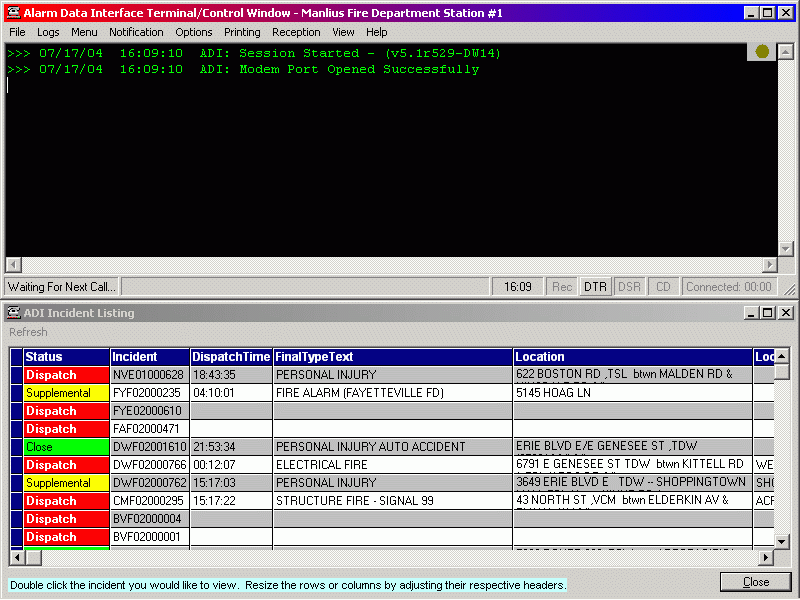
ADI stores all received incidents in its database. The database is displayed in a separate window that allows you to
quickly see the status of an incident (open or closed) as well as letting you view
the complete incident with just a click of the mouse.
|
|
Our Incident Data Sharing and Export option allows third-party
software developers such as Blue Devil Data© to import data from ADI in to
their incident reporting program. Optionally, ADI can export some crucial
incident data fields to NFIRS software vendors such as Emergency Reporting, FIREHOUSE Software© and FirePrograms Software. Both
of these features will allow your incident reports to be pre-filled with data from
CAD. All exported incident files are then automatically uploaded to the vendor.
|
|
"Incident Data Forwarding" allows an agency with
multiple stations to receive data from the dispatch center and then forward it via TCP/IP to as many as nine satellite fire stations running ADI.
|
|
ADI is designed to interface with Northrop Grumman/PRC,
New World Systems' Aegis, Intergraph, Positron, LogiSYS and XML data formats.
Other CAD system formats can be added relatively quickly.
|
|
Remote Log Viewer (available at no charge when you purchase
ADI) will allow your staff to remotely view ADI's Incident Listing from another
location on your network.
|
|
ADI will also interface to IDEx. When a dispatch is received,
IDEx will suspend its normal
cycling and freeze some crucial dispatch information on the computer's screen
in large, easy to read characters and at the same time will speak some of the
key incident data. Also, if you install our BetaBrite / Alpha Electronic Messaging
Signs, IDEx will display key dispatch data on each sign.
|
|
ADI contains its own Dynamic DNS client which allows your dispatch center and others to always be able to connect to your fire station over the Internet. Agencies that receive their data via TCP/IP will benefit from this feature the most. This service is available at no additional charge to agencies that subscribe to our Annual ADI Support Agreement.
|
|
ADI operates by first capturing formatted ASCII textual data* or XML data from an authorized sender such as a dispatch center. ADI is specifically configured to recognize the format that your dispatch center's CAD system outputs. Data can be transmitted to ADI by radio or via TCP/IP connections. ADI is also capable of receiving CAD data via e-mail or by polling remote databases or web services. After ADI receives the CAD data it then parses and formats the text which is then saved in its own database, outputted to printers, e-mail, cellular telephones, fire station LED display boards, other ADI clients, etc.
Interested in ADI working for your department? Contact us for specifics.
*CAD systems that fax text or images of text are not compatible with ADI because they are sending your incident data as an image.
|
ADI Installation Requirements
Be sure to check the hardware requirements for IDEx if those applications will be used |
|
|
|
FDCMS provides e-mail and telephone technical support for each registered version of ADI for thirty days from the date of purchase. After that, remote technical support is available for a fee.
We also offer an Alarm Data Interface Service agreement. This option includes all significant feature upgrades and format changes imposed by others (county CAD upgrades) while the agreement is in effect. Application updates are available for instant download from the Downloads page of this web site. Remote technical support is included here for the life of this agreement.
A 30 day evaluation version of ADI can be acquired from the Downloads page of this site. Contact FDCMS Support for an Agency Key to activate the application.